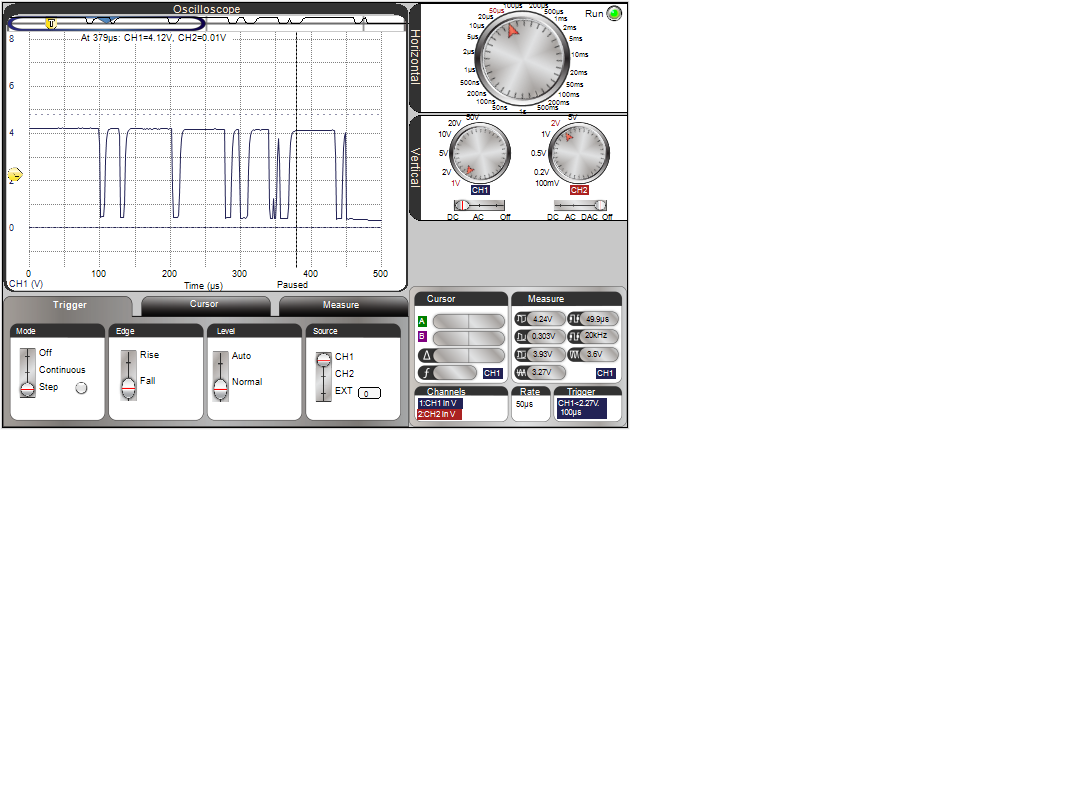
Switch debouncing, carried further. lots of fun. from the Arduino Cookbook, 2nd ED, Ch. 5.2-4
const int led_pin = 13;
const int input_pin = 2;    // switch input
const int debounce_delay = 10;
const int program_cycle_pin = 10
int bounce_count = 0;
int pb_on = 0;   // time from 1st pb press
int pb_bounce = 0;  //total bounce time
int pb_press = 0;
boolean pb_bounce_end = 0;

void setup() {
  pinMode(led_pin,OUTPUT);
  pinMode(input_pin,INPUT);
  digitalWrite(input_pin,HIGH);  // turns on internal pull-up R
  Serial.begin(19200);
  delay(100);
}

void loop() {
  digitalWrite(program_cycle_pin,HIGH);
  int pb_val = digitalRead(input_pin);
  //Serial.print("beg loop ");
  //Serial.print(pb_val); Serial.print(" "); Serial.print(pb_on); Serial.print(" "); Serial.println(pb_press);
  if (pb_val == HIGH) {
    digitalWrite(led_pin,LOW);  // pb off
    bounce_count = 0;
    if (pb_press == 1) {
    pb_on++;
    pb_bounce++;
    }
    if (pb_bounce_end  == 1) {
      //Serial.print("HI");
      pb_on = 0;
      pb_bounce_end = 0;
      pb_bounce = 0;
      pb_press = 0;
     delay(1000);  // need to figure better way to get let go bounce time
    }
  }
  else {
    digitalWrite(led_pin,HIGH);  // pb pressed
    pb_press = 1;
    pb_on++;
    pb_bounce++;
    bounce_count++;
  }
  //Serial.print("end loop ");
  //Serial.print(pb_on); Serial.print(" "); Serial.println(bounce_count);
  if (bounce_count == 10) {
    Serial.print("Debounce Delay "); Serial.print(debounce_delay); Serial.println(" msec");
    Serial.print("PB Bounce for "); Serial.print(pb_bounce); Serial.println(" msec");
    Serial.print("PB ON for "); Serial.print(pb_on); Serial.println(" msec");
    Serial.print("\n");
    pb_bounce_end = 1;
  }
  if (pb_on == 1000) {
    Serial.print("PB ON for "); Serial.print(pb_on); Serial.println("msec");
  }
  digitalWrite(program_cycle_pin,LOW);
  delay(1);
}
no R needed. had some trouble with stupidity in programming.
used push-button switch, took scope photo :